Java · Track 2 · Tutorial 3 of 4
Keep the chart in step
Your chart changes over time. Send those changes so BrizoConsol keeps step: new accounts, new names, and accounts you no longer use.
You will needThe chart from Send your chart of accounts.
By the endA chart send that adds, renames and retires accounts, without losing any account's history.
1Decide how your chart is sent
Most systems send their whole chart each time. Tell BrizoConsol which kind of send it is with mode:
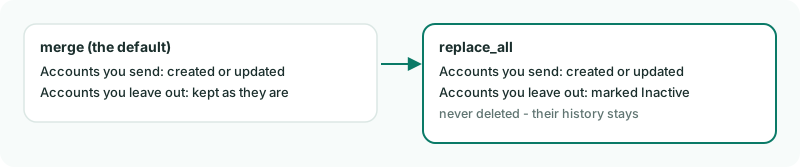
merge keeps what you leave out, replace_all retires it.2Send the whole chart, with changes
Create SyncChart.java. It renames account 4000 and leaves out 6900, which the first chart had:
SyncChart.java
// SyncChart.java - sends the whole chart, so accounts it leaves out are retired.
import java.util.List;
import java.util.Map;

public class SyncChart {
    public static void main(String[] args) throws Exception {
        List<Map<String, Object>> accounts = List.of(
                Map.of("code", "1000", "name", "Operating bank", "type", "Bank"),
                Map.of("code", "1200", "name", "Trade receivables", "type", "Accounts Receivable"),
                Map.of("code", "2000", "name", "Trade payables", "type", "Accounts Payable"),
                Map.of("code", "4000", "name", "Sales - products", "type", "Revenue"), // renamed
                Map.of("code", "5000", "name", "Cost of sales", "type", "Direct Costs"),
                Map.of("code", "6000", "name", "Rent", "type", "Expense"));
                // 6900 Sundry expenses is left out: replace_all marks it Inactive

        var request = Brizo.written(Brizo.call("POST", "/organisations/" + Brizo.COMPANY_ID + "/accounts", Map.of(
                "declarations", Map.of("source_reference", "my-ledger", "mode", "replace_all"),
                "records", accounts)));

        Brizo.show("Chart", request);
        System.out.println("Retired: " + request.path("result").path("retired").asInt(0));
    }
}3Run it
gradle -q run -Pmain=SyncChartCheck
Chart: request 91 - 0 created, 1 updated, 5 unchanged, 0 refused
Retired: 1
4000 is updated with its new name, five accounts are unchanged, and 6900 is retired - marked Inactive.
4Rename, retire, never re-code
- To rename an account, send its code with the new name.
- To retire one, leave it out of a
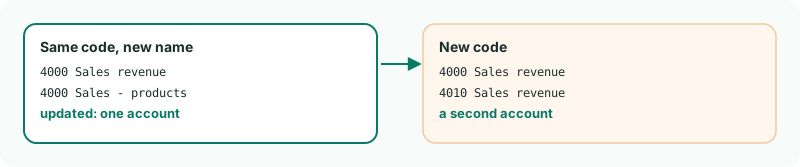
replace_allsend, or send it with"status": "Inactive". - Never change a code to rename. A new code is a new account; the old one stays, with its history.
Want more detail? See the documentation