Java · Track 2 · Tutorial 4 of 4
Read your chart back
Read the chart BrizoConsol holds for the company - every account, its type and whether it's in use - so your code can check codes before sending figures.
You will needA chart sent in the earlier tutorials of this track.
By the endA script that lists the company's accounts, and filters for the ones you need.
1Why read the chart back
Reading the chart tells you what BrizoConsol holds now - including accounts someone added on screen, and accounts you retired. It's the list to check codes against before you send a month.
2Read it
Create ReadChart.java:
ReadChart.java
// ReadChart.java - reads the company's chart of accounts back.
import com.fasterxml.jackson.databind.JsonNode;

public class ReadChart {
    public static void main(String[] args) throws Exception {
        Brizo.Answer answer = Brizo.call("GET", "/organisations/" + Brizo.COMPANY_ID + "/accounts");
        for (JsonNode account : answer.body().path("data")) {
            System.out.println(String.format("%-6s%-22s%-22s%s", account.path("code").asText(), account.path("name").asText(),
                    account.path("type").asText(), account.path("status").asText()));
        }
    }
}
3Run it
gradle -q run -Pmain=ReadChartCheck
1000  Operating bank        BANK                  Active
1200  Trade receivables     ACCOUNTS RECEIVABLE   Active
2000  Trade payables        ACCOUNTS PAYABLE      Active
4000  Sales - products      REVENUE               Active
5000  Cost of sales         DIRECT COSTS          Active
6000  Rent                  EXPENSE               Active
6900  Sundry expenses       EXPENSE               Inactive
4000 shows its new name and 6900 is Inactive, from the previous tutorial.

4Narrow it down
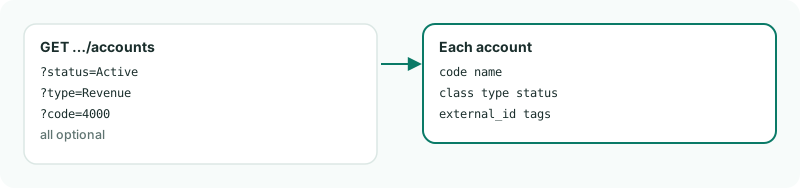
Add ?status=Active for the accounts in use, ?type=Revenue for one type, or ?code=4000 for one account. A code the company doesn't hold answers 404.
Want more detail? See the documentation