Java · Track 2 · Tutorial 1 of 4
Send your chart of accounts
Send the company's chart of accounts: the list of account codes every figure you send later will refer to.
1Why the chart comes first
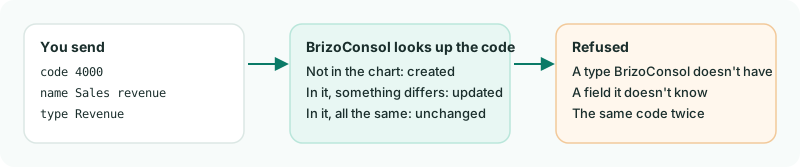
The trial balance, invoice and bill lines and journal lines you send later all name an account by its code. BrizoConsol only accepts codes the company's chart already holds, so the chart is always the first thing you send - and the thing you send again whenever your chart changes.
2Write the chart
Create Chart.java. Each account has a code, a name, and a type - one of BrizoConsol's account types, by name: Bank, Accounts Receivable, Revenue, Expense and so on.
Chart.java
// Chart.java - sends the company's chart of accounts.
import java.util.List;
import java.util.Map;

public class Chart {
    public static void main(String[] args) throws Exception {
        List<Map<String, Object>> accounts = List.of(
                Map.of("code", "1000", "name", "Operating bank", "type", "Bank"),
                Map.of("code", "1200", "name", "Trade receivables", "type", "Accounts Receivable"),
                Map.of("code", "2000", "name", "Trade payables", "type", "Accounts Payable"),
                Map.of("code", "4000", "name", "Sales revenue", "type", "Revenue"),
                Map.of("code", "5000", "name", "Cost of sales", "type", "Direct Costs"),
                Map.of("code", "6000", "name", "Rent", "type", "Expense"),
                Map.of("code", "6900", "name", "Sundry expenses", "type", "Expense"));

        var request = Brizo.written(Brizo.call("POST", "/organisations/" + Brizo.COMPANY_ID + "/accounts", Map.of(
                "declarations", Map.of("source_reference", "my-ledger", "mode", "merge"),
                "records", accounts)));

        Brizo.show("Chart", request);
    }
}
source_reference is your own name for where the data comes from - my-ledger here. Use the same name every time you send from the same system.
The answer is counted for you by Brizo.show(). Add it, with the method it uses to list refused records, to the Brizo class in Brizo.java:
Brizo.java
    // A write answers 202 when it was written. Anything else stops the script with BrizoConsol's own reason.
    public static JsonNode written(Answer answer) {
        if (answer.status() == 202) {
            return answer.body();
        }

        JsonNode body = answer.body() == null ? JSON.createObjectNode() : answer.body();
        StringBuilder reason = new StringBuilder(body.path("message").asText("No reason given"));
        for (JsonNode error : body.path("errors")) {
            reason.append("\n  ").append(error.path("field").asText()).append(": ")
                    .append(error.path("code").asText()).append(" - ").append(error.path("detail").asText());
        }
        if (body.path("failure").has("code")) {
            reason.append("\n  ").append(body.path("failure").path("code").asText());
        }

        throw new RuntimeException("Refused (" + answer.status() + "): " + reason);
    }
Brizo.java
    // Lists the records a written request refused, with BrizoConsol's reason for each.
    public static void reportRefused(JsonNode request) throws Exception {
        if (request.path("counts").path("rejected").asInt() == 0) {
            return;
        }

        JsonNode results = call("GET", "/organisations/" + COMPANY_ID + "/requests/" + request.path("id").asText() + "/results").body();
        for (JsonNode record : results.path("records")) {
            for (JsonNode error : record.path("errors")) {
                System.out.println("  Refused record " + record.path("index").asText() + " (" + record.path("identity").asText() + "): "
                        + error.path("code").asText() + " - " + error.path("detail").asText());
            }
        }
    }
Brizo.java
    // Prints what a written request did.
    public static void show(String what, JsonNode request) throws Exception {
        JsonNode c = request.path("counts");
        System.out.println(what + ": request " + request.path("id").asText() + " - " + c.path("created").asText() + " created, "
                + c.path("updated").asText() + " updated, " + c.path("unchanged").asText() + " unchanged, "
                + c.path("rejected").asText() + " refused");
        reportRefused(request);
    }
3Send it
gradle -q run -Pmain=ChartCheck
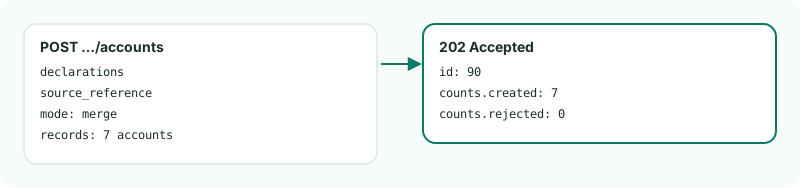
Chart: request 90 - 7 created, 0 updated, 0 unchanged, 0 refusedYour request number will be different: every request gets the next number. Run it again and every account is unchanged: sending the same chart twice changes nothing.
4Which account types there are
The type must be one BrizoConsol has. Ask for the list with GET /account-types; the names are matched whatever their capitals. A type BrizoConsol doesn't have refuses that account, and the rest of the chart is still stored.
5Limits to know
- A company's chart holds up to 300 accounts. A request that would take it past that is refused whole.
- A chart is sent for a company, never for a group: groups hold no accounts of their own.
Want more detail? See the documentation