JavaScript · Track 1 · Tutorial 1 of 3
Set up your JavaScript project
Get a JavaScript project ready for the BrizoConsol API: check Node.js, create the folder every tutorial in this series builds on, and keep your credential where your code can read it but nobody else can.
1Check Node.js
You need Node.js 18 or later. Nothing else is installed: the scripts use Node's own fetch and JSON.
node --versionCheck
It prints v18 or later. If it's older, or node isn't found, install the current LTS release of Node.js first.
2Create the project folder
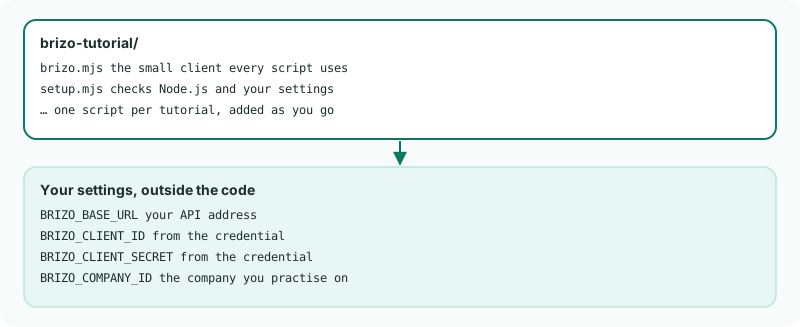
Make a folder called brizo-tutorial. Every script in this series goes in it, next to one shared file.
The files end in .mjs, which makes them JavaScript modules: they can import the shared file and use await at the top level, with no package.json and nothing to install.
3Keep your settings out of the code
Your client secret is a password: keep it out of any file you might share. Set the four settings as environment variables in the terminal you'll run the scripts from. In bash or zsh:
export BRIZO_BASE_URL=https://sg.brizoconsol.com/api/v1
export BRIZO_CLIENT_ID=your-client-id
export BRIZO_CLIENT_SECRET=your-client-secret
export BRIZO_COMPANY_ID=149
In PowerShell:
$env:BRIZO_BASE_URL = "https://sg.brizoconsol.com/api/v1"
$env:BRIZO_CLIENT_ID = "your-client-id"
$env:BRIZO_CLIENT_SECRET = "your-client-secret"
$env:BRIZO_COMPANY_ID = "149"
Use your own region's address, the client ID and secret from Getting started, and your company's ID. You'll find the ID in tutorial 3; until then leave 149.
4Add the shared client
Create brizo.mjs with the part that reads the settings. The next two tutorials add signing in and sending requests to the same file.
brizo.mjs
const TIMEOUT_MS = 60_000;

export function setting(name) {
    const value = process.env[name];
    if (value === undefined || value === '') {
        console.error(`Set the environment variable ${name} first.`);
        process.exit(1);
    }
    return value;
}

export const baseUrl = setting('BRIZO_BASE_URL').replace(/\/+$/, ''); // e.g. https://sg.brizoconsol.com/api/v1
const clientId = setting('BRIZO_CLIENT_ID');
const clientSecret = setting('BRIZO_CLIENT_SECRET');
export const companyId = setting('BRIZO_COMPANY_ID');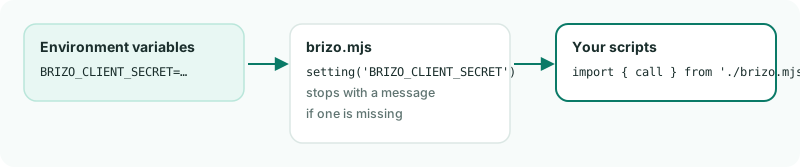
brizo.mjs reads it from the environment.5Run the check
Create setup.mjs:
setup.mjs
// setup.mjs - checks that Node.js and your settings are ready.
const major = Number(process.versions.node.split('.')[0]);
console.log(`Node.js ${process.versions.node}` + (major >= 18 ? ' - ready' : ' - needs 18 or later'));
console.log('fetch: ' + (typeof fetch === 'function' ? 'built in' : 'missing - use Node.js 18 or later'));

const { baseUrl, companyId } = await import('./brizo.mjs');

console.log(`Base URL: ${baseUrl}`);
console.log(`Company: ${companyId}`);
node setup.mjsCheck
Node.js 22.23.4 - ready
fetch: built in
Base URL: https://sg.brizoconsol.com/api/v1
Company: 149
Your Node.js version and address will be your own. If a setting is missing, the script names it and stops.
Want more detail? See the documentation