Start here
Getting started
Before you write any code, get four things ready: access to the API, a company to practise on, a credential, and your API address. This part is the same whichever language you use.
1Check your group can use the API
The API is part of the Premium plan. On any other plan the API Access screen opens, but it offers an upgrade instead of letting you create a credential.
Credentials are created by someone who administers data on the group. If that isn't you, ask them to do step 3 with you.
2Choose a company to practise on
Every tutorial sends real figures: it adds accounts to a company's chart, sends a month of figures, invoices, bills and journal lines. Sending a month also sets your group's reporting month to that month.
Use a company that holds no real figures
Add a company to your group for testing, or use one you already keep for it.
3Create the credential
A credential is what your code signs in with. It names the organisations it may use and what it may do there.
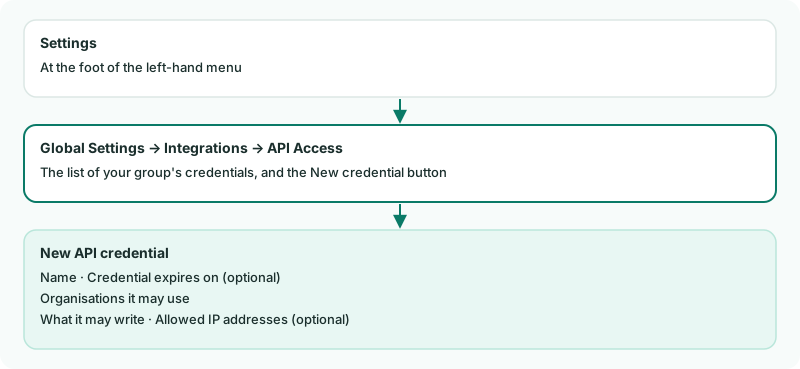
- Click Settings at the foot of the left-hand menu, open Global Settings, and click API Access under Integrations.
- Click New credential, and give it a name you'll recognise - Tutorial, say.
- Under Organisations it may use, tick the company you chose in step 2, and the group (listed first, marked (group)) for the tutorials that read the consolidated figures.
- Under What it may write, tick every box. The tutorials use them all; a credential for your own system later needs only what that system does.
- Leave Credential expires on and Allowed IP addresses empty, and click Create credential.
Check
The screen shows the Client ID and the Client secret. Copy both now and keep them somewhere safe: the secret is shown only this once. If you lose it, create a new credential and revoke this one.
4Find your API address
Your group lives in one region. Your API address is that region's address followed by /api/v1:
| Singapore | https://sg.brizoconsol.com/api/v1 |
|---|---|
| Australia | https://au.brizoconsol.com/api/v1 |
| United Kingdom | https://uk.brizoconsol.com/api/v1 |
| United States | https://us.brizoconsol.com/api/v1 |
5Know how the API behaves
Four things shape every tutorial that follows:
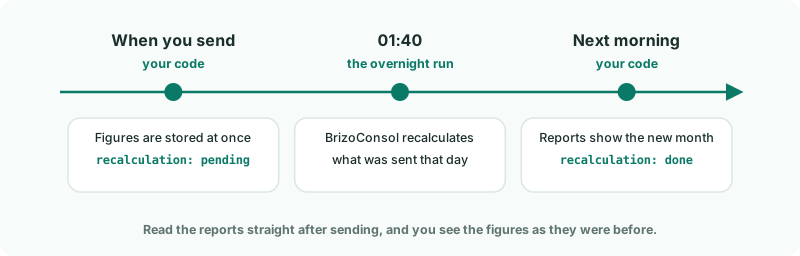
- Figures are recalculated overnight. What you send is stored at once, but your reports are rebuilt by the overnight run at 01:40. So the tutorials send today and read the next morning.
- One company, one write at a time. A second write for the same company while one is running is turned away with a request to try again. Your code waits and sends it again.
- There are limits. By default a request carries up to 1,000 records, and your group can make 60 requests a minute.
- A refused record doesn't stop the rest. The records that pass are stored, and each refused one comes back with its reason.
6Pick your language
Everything from here is written in your language: setting up the project, signing in, and each thing you send. Each language follows the same eight tracks, from your first call to running it every month.
You'll need the client ID and secret from step 3, the address from step 4, and the company from step 2. The first tutorial in your language shows you how to keep them out of your code.
Want more detail? See the documentation