JavaScript · Track 6 · Tutorial 1 of 2
Send operational data
Send the numbers behind the money - headcount, volumes, hours - so they sit beside the financial figures.
1What operational data is
The numbers behind the money: headcount, units sold, hours worked, square metres. BrizoConsol keeps them beside the financial figures, so you can put them side by side - revenue per head, cost per unit.
2Shape your rows
Each row is one figure for one month, described by up to five dimensions - department, location, product, whatever your figure is broken down by. A row is identified by its month, scenario, dimensions and account, so sending the same row again updates its value.
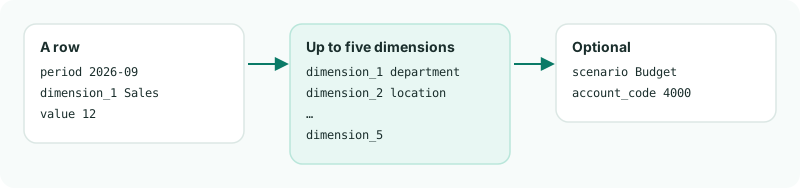
3Send September's headcount
Create operational.mjs:
operational.mjs
// operational.mjs - sends September's headcount by department.
import { call, companyId, show, written } from './brizo.mjs';

const rows = [
    { period: '2026-09', dimension_1: 'Sales', value: 12 },
    { period: '2026-09', dimension_1: 'Operations', value: 8 },
    { period: '2026-09', dimension_1: 'Finance', value: 3 },
];

const request = written(await call('POST', `/organisations/${companyId}/operation-data`, {
    declarations: {
        source_reference: 'headcount',
        period: '2026-09',
        value_basis: 'company_base',
        rate_direction: 'document_to_base',
        base_currency: 'SGD',
    },
    records: rows,
}));

await show('Headcount', request);
node operational.mjsCheck
Headcount: request 100 - 3 created, 0 updated, 0 unchanged, 0 refused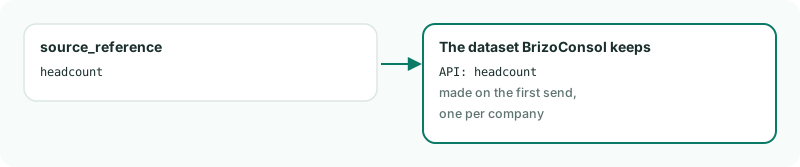
source_reference becomes a dataset of its own, named after it.4The source becomes the dataset
The first send from a source_reference creates a dataset for the company named API: and the source - API: headcount here. Send other figures under other source names, and each becomes a dataset of its own.
5Sending a month again
- Each send replaces this source's figures for the month and scenario: a row you leave out is removed. Send
"mode": "merge"to add and update only. - Figures are kept as you send them; they aren't converted to another currency.
- A company holds up to 1,000 rows a month.
Want more detail? See the documentation