JavaScript · Track 5 · Tutorial 3 of 4
Check your lines against the trial balance
Make sure the postings you sent add up to the month's figures - BrizoConsol compares them for you after every send.
You will needA month from track 3 and the journals from Send journal lines.
By the endA check, after every journal send, that the postings and the trial balance agree.
1Why compare
If the journal lines don't add up to the trial balance, something was missed - a journal not sent, a month sent incomplete. After every journal send, BrizoConsol compares the two for you.
2Read the control total
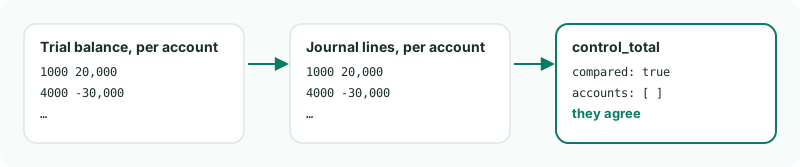
The comparison comes back in the answer, as result.control_total. journals.mjs already reads it:
const control = request.result.control_total;
if (!control.compared) {
    console.log('No trial balance from the API for this month to compare with.');
} else if (control.accounts.length === 0) {
    console.log('The lines add up to the trial balance, account by account.');
} else {
    for (const account of control.accounts) {
        console.log(`  ${account.account_code}: lines ${account.ledger}, trial balance ${account.trial_balance}`);
    }
}
3What it compares
- Each account's net - debits less credits - in the trial balance this API sent for the month and scenario, against the net of this source's journal lines for the month.
- Accounts agree when they're within half a cent.
compared: falsemeans there was no trial balance from the API for the month to compare with: send the month first.
4When they disagree
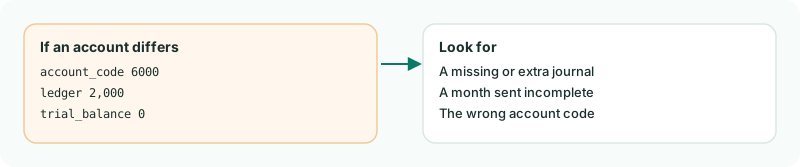
Each account that differs is listed with both figures. Our journals add up exactly, so the list is empty - but send the month with a line missing and you'd see that account here.
Want more detail? See the documentation