Java · Track 1 · Tutorial 2 of 3
Get a token and keep it fresh
Sign your code in to BrizoConsol, keep it signed in as the token runs out, and handle the two answers that simply mean try again.
1Understand the two tokens
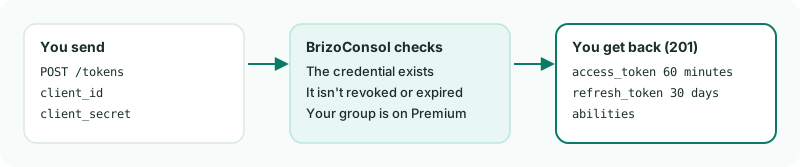
Your code doesn't send the client secret with every call. It signs in once and gets two tokens back: an access token, sent with every call and good for 60 minutes, and a refresh token, good for 30 days, which buys the next pair.
2Add the HTTP call
Add this to the Brizo class in Brizo.java. It makes one call and gives back the status, the headers and the answer. It asks for JSON on every call, so even a refusal comes back as JSON.
Brizo.java
    public record Answer(int status, Map<String, String> headers, JsonNode body) {}

    static final HttpClient HTTP = HttpClient.newBuilder().connectTimeout(TIMEOUT).build();

    // One HTTP call: answers the status, the response headers and the decoded JSON body.
    public static Answer send(String method, String path, Object body, Map<String, String> headers) throws Exception {
        HttpRequest.Builder request = HttpRequest.newBuilder(URI.create(BASE_URL + path))
                .timeout(TIMEOUT)
                .header("Accept", "application/json")
                .header("Content-Type", "application/json");
        headers.forEach(request::header);
        if (body != null || method.equals("POST")) {
            String json = body == null ? "" : JSON.writeValueAsString(body);
            request.method(method, HttpRequest.BodyPublishers.ofString(json));
        } else {
            request.method(method, HttpRequest.BodyPublishers.noBody());
        }

        HttpResponse<String> response;
        try {
            response = HTTP.send(request.build(), HttpResponse.BodyHandlers.ofString());
        } catch (IOException e) {
            throw new RuntimeException("Could not reach BrizoConsol: " + e.getMessage());
        }

        JsonNode decoded = null;
        try {
            decoded = response.body().isEmpty() ? null : JSON.readTree(response.body());
        } catch (JsonProcessingException e) {
            // not JSON: a proxy or gateway answered instead of BrizoConsol
        }

        Map<String, String> responseHeaders = new HashMap<>();
        response.headers().map().forEach((name, values) ->
                responseHeaders.put(name.toLowerCase(Locale.ROOT), String.join(", ", values)));

        return new Answer(response.statusCode(), responseHeaders, decoded);
}3Add signing in and renewing
Add these two methods. Brizo.getToken() signs in. Brizo.refreshToken() spends the refresh token for a new pair - and if that refresh token was already used or has expired, it signs in again.
Brizo.java
    static JsonNode tokens = null;

    public static JsonNode getToken() throws Exception {
        Answer answer = send("POST", "/tokens", Map.of("client_id", CLIENT_ID, "client_secret", CLIENT_SECRET), Map.of());
        if (answer.status() != 201) {
            String message = answer.body() == null ? "" : answer.body().path("message").asText();
            throw new RuntimeException("Sign-in refused (" + answer.status() + "): " + message);
        }
        tokens = answer.body();

        return tokens;
    }

    public static void refreshToken() throws Exception {
        Answer answer = send("POST", "/tokens/refresh", Map.of("refresh_token", tokens.path("refresh_token").asText()), Map.of());
        if (answer.status() == 201) {
            tokens = answer.body();
            return;
        }
        getToken(); // the refresh token was already used or has expired: sign in again
    }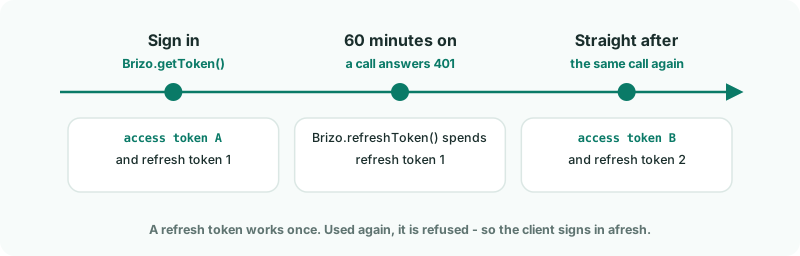
401 spends the refresh token, and the call is sent again.4Add the call every script uses
Every call after signing in goes through Brizo.call(). It sends the access token, and handles the two answers that mean send it again:
- 401 - the access token has expired. It renews once and sends the call again.
- 429 - the company is busy with another write, or your group has used its requests for the minute. Nothing was written, so it waits as long as BrizoConsol asks and sends again.
Brizo.java
    // Every call after sign-in goes through here. It sends the access token, and handles the two answers that mean
    // "send it again": 401 (the token expired) and 429 (the company is busy, or the minute's requests are used up).
    public static Answer call(String method, String path, Object body, Map<String, String> headers) throws Exception {
        if (tokens == null) {
            getToken();
        }

        boolean refreshed = false;
        for (int attempt = 1; attempt <= 5; attempt++) {
            Map<String, String> withToken = new HashMap<>(headers);
            withToken.put("Authorization", "Bearer " + tokens.path("access_token").asText());
            Answer answer = send(method, path, body, withToken);

            if (answer.status() == 401 && !refreshed) {
                refreshToken();
                refreshed = true;
                continue;
            }

            if (answer.status() == 429) {
                String wait = answer.headers().getOrDefault("retry-after", "5");
                Thread.sleep(1000L * (wait.matches("\\d+") ? Long.parseLong(wait) : 5));
                continue; // nothing was written for this call
            }

            return answer;
        }

        throw new RuntimeException(method + " " + path + " is still answering 429 after five attempts.");
    }

    public static Answer call(String method, String path, Object body) throws Exception {
        return call(method, path, body, Map.of());
    }

    public static Answer call(String method, String path) throws Exception {
        return call(method, path, null, Map.of());
}5Sign in
Create Token.java and run it:
Token.java
// Token.java - signs in with your credential and shows what the token may do.
import com.fasterxml.jackson.databind.JsonNode;

public class Token {
    public static void main(String[] args) throws Exception {
        JsonNode tokens = Brizo.getToken();

        System.out.println("Signed in. The access token lasts " + tokens.path("expires_in").asText() + " seconds.");
        System.out.println("It may:");
        for (JsonNode ability : tokens.path("abilities")) {
            System.out.println("  " + ability.asText());
        }
    }
}
gradle -q run -Pmain=TokenCheck
Signed in. The access token lasts 3600 seconds.
It may:
  read
  write
  organisation:149
  scope:accounts.write
  …
organisation: lists each company the credential can reach, and scope: each box you ticked. If sign-in is refused, the message says why: The client id and secret do not match means a typing error in a setting.