Java · Track 4 · Tutorial 3 of 4
Send documents in another currency
Send invoices and bills in the currency they were raised in, with the rate your system used - and tell BrizoConsol which way that rate runs.
You will needThe invoices from Send your invoices.
By the endA foreign-currency invoice in BrizoConsol, beside the company's own-currency ones.
1Documents can be in any currency
Your customers and suppliers may be billed in their own currency. Send the document in that currency, with the rate your system used.
2Say how amounts and rates are stated
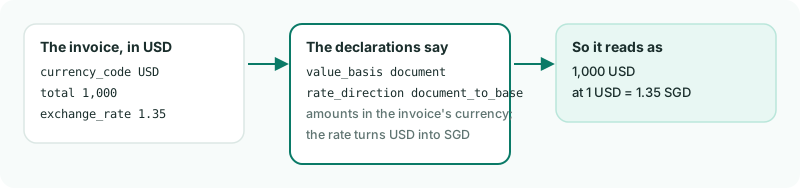
Two declarations cover every document in the request:
value_basis-documentwhen amounts are in each document's own currency,company_basewhen they're already in the company's.rate_direction-document_to_basewhen the rate turns the document's currency into the company's (1 USD = 1.35 SGD),base_to_documentfor the other way round.
3Send September's invoices, one in US dollars
Create ForeignInvoice.java. It sends both September invoices - the month is sent whole - and the second is in US dollars:
ForeignInvoice.java
// ForeignInvoice.java - sends September's invoices, one of them in US dollars.
import java.util.List;
import java.util.Map;

public class ForeignInvoice {
    public static void main(String[] args) throws Exception {
        List<Map<String, Object>> invoices = List.of(
                Map.of(
                        "external_id", "INV-1001",
                        "number", "INV-1001",
                        "party_name", "Harbour Trading Pte Ltd",
                        "date", "2026-09-08",
                        "due_date", "2026-10-08",
                        "total", 10000.00,
                        "amount_paid", 5000.00,
                        "amount_due", 5000.00,
                        "lines", List.of(
                                Map.of("line_item_id", "INV-1001-1", "account_code", "4000", "description", "Office chairs", "amount", 10000.00))),
                Map.of(
                        "external_id", "INV-1002",
                        "number", "INV-1002",
                        "party_name", "Pacific Desk Co",
                        "party_country", "United States",
                        "date", "2026-09-21",
                        "due_date", "2026-10-21",
                        "currency_code", "USD",
                        "exchange_rate", 1.35,   // 1 USD = 1.35 SGD
                        "total", 1000.00,        // in USD
                        "lines", List.of(
                                Map.of("line_item_id", "INV-1002-1", "account_code", "4000", "description", "Standing desks", "amount", 1000.00))));

        var request = Brizo.written(Brizo.call("POST", "/organisations/" + Brizo.COMPANY_ID + "/invoices", Map.of(
                "declarations", Map.of(
                        "source_reference", "my-ledger",
                        "period", "2026-09",
                        "value_basis", "document",           // amounts are in each invoice's own currency
                        "rate_direction", "document_to_base", // the rate turns USD into SGD
                        "base_currency", "SGD"),
                "records", invoices)));

        Brizo.show("Invoices", request);
    }
}
gradle -q run -Pmain=ForeignInvoiceCheck
Invoices: request 98 - 1 created, 0 updated, 1 unchanged, 0 refusedINV-1002 is created. INV-1001 is unchanged: its total, payments, status and customer are the same as before.
4The rules about rates
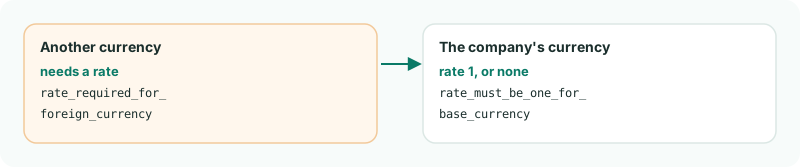
Each refuses just that document.