Java · Track 3 · Tutorial 4 of 6
Send a budget or forecast
Send your budget or forecast the same way as a month of actuals - and learn the three ways a plan month behaves differently.
1Plans go in like a month
A budget or a forecast is sent the same way as a month's trial balance, with one more declaration: scenario, set to Budget or Forecast. Without it, a month is Actual.
2Send October's budget
Create Budget.java:
Budget.java
// Budget.java - sends a month of budget.
import java.util.List;
import java.util.Map;

public class Budget {
    public static void main(String[] args) throws Exception {
        var request = Brizo.written(Brizo.call("POST", "/organisations/" + Brizo.COMPANY_ID + "/trial-balances", Map.of(
                "declarations", Map.of(
                        "source_reference", "my-budget",
                        "period", "2026-10",
                        "scenario", "Budget",
                        "value_basis", "company_base",
                        "rate_direction", "document_to_base",
                        "base_currency", "SGD"),
                "records", List.of(
                        Map.of("account_code", "4000", "debit", 0, "credit", 32000.00),
                        Map.of("account_code", "5000", "debit", 8500.00, "credit", 0),
                        Map.of("account_code", "6000", "debit", 2000.00, "credit", 0))),
                Map.of("Idempotency-Key", Brizo.COMPANY_ID + "-2026-10-budget-v1")));

        Brizo.show("Budget", request);
    }
}
gradle -q run -Pmain=BudgetCheck
Budget: request 95 - 3 created, 0 updated, 0 unchanged, 0 refused3How a plan month differs
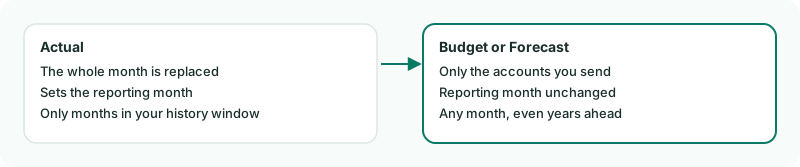
- Only the accounts you send are replaced. A plan is entered account by account, so a send that names three accounts leaves the rest of the month's plan alone.
- The reporting month doesn't move.
- Any month can be planned, even beyond the history your plan keeps. A locked month is still refused.
4Check where your group enters plans
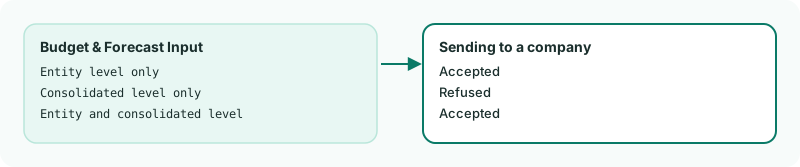
Each group decides whether budgets and forecasts are entered for each company, for the group as a whole, or both. Sending a plan to a company is refused if the group only takes them at consolidated level: Plan movement is entered at group level for this group…
The setting is Budget & Forecast Input on the group's Organisation Details page (Settings → Organisation Settings → Organisation Details, with the group selected).
Want more detail? See the documentation