C# · Track 3 · Tutorial 2 of 6
Send it safely more than once
Make sending a month safe to repeat: a retry that never counts twice, and code that waits when BrizoConsol asks it to.
1Why sending twice happens
A network drops, a script is run twice, a scheduler fires again. Your code needs to send a month again without it counting twice - and to know when BrizoConsol simply asks it to wait.
2Use an Idempotency-Key
Month.cs sends a header made of the company, the month and a version:
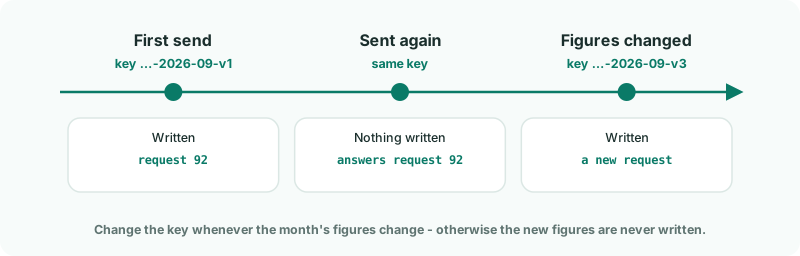
new() { ["Idempotency-Key"] = $"{Brizo.CompanyId}-{period}-{version}" }Send it again and BrizoConsol finds the key, answers with the first request, and writes nothing.
dotnet run -- MonthCheck
Trial balance: request 92 - 6 created, 0 updated, 0 unchanged, 0 refused
Recalculation: pending
The same request number as before: nothing was written the second time.
3Change the key when the figures change
A key that was already used never writes again - even if the figures in the body are different. When a month's figures change, change version - v2, v3 - so the new figures are written.
4Let the client wait when a company is busy
BrizoConsol writes one request at a time for a company. A second one arriving meanwhile is turned away with 429 and write_in_flight; nothing was written, and Retry-After says how many seconds to wait. Brizo.Call() already does this, up to five attempts:
Brizo.cs
    // Every call after sign-in goes through here. It sends the access token, and handles the two answers that mean
    // "send it again": 401 (the token expired) and 429 (the company is busy, or the minute's requests are used up).
    public static async Task<Answer> Call(string method, string path, object? body = null, Dictionary<string, string>? headers = null)
    {
        if (tokens is null)
        {
            await GetToken();
        }

        var refreshed = false;
        for (var attempt = 1; attempt <= 5; attempt++)
        {
            var withToken = new Dictionary<string, string>(headers ?? new()) { ["Authorization"] = $"Bearer {tokens!["access_token"]}" };
            var answer = await Send(method, path, body, withToken);

            if (answer.Status == 401 && !refreshed)
            {
                await RefreshToken();
                refreshed = true;
                continue;
            }

            if (answer.Status == 429)
            {
                var wait = int.TryParse(answer.Headers.GetValueOrDefault("retry-after"), out var seconds) ? seconds : 5;
                await Task.Delay(TimeSpan.FromSeconds(wait));
                continue; // nothing was written for this call
            }

            return answer;
        }

        throw new Exception($"{method} {path} is still answering 429 after five attempts.");
    }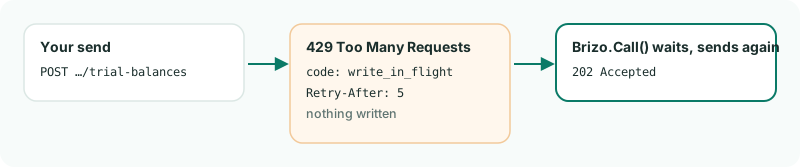
Brizo.Call() waits as asked and sends again.5Send in order, not at once
Send one company's requests one after another, not side by side: they'd only queue up behind each other's 429s. Different companies can be sent in parallel - but your group shares 60 requests a minute.
Want more detail? See the documentation