C# · Track 8 · Tutorial 1 of 4
Put the steps in order
Put everything together in one run: the chart, the month, the detail, and the consolidation request - in the order BrizoConsol needs them.
1Put it together
Every track so far sent one thing. A monthly run sends them all, in the order BrizoConsol needs them.
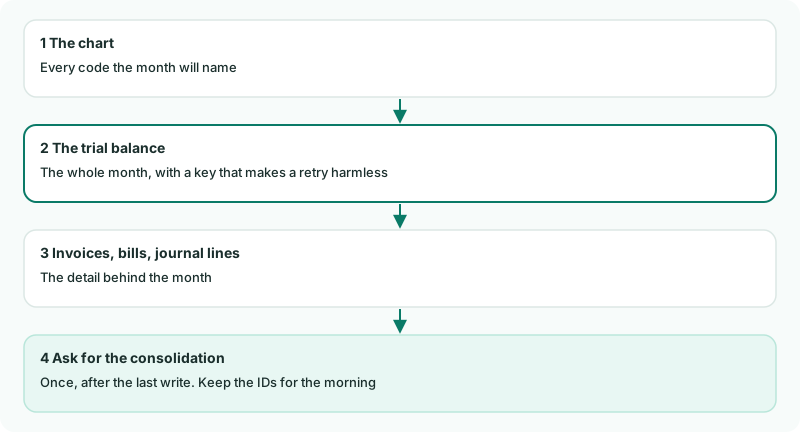
2Write the run
Create Monthly.cs. Its two methods, ChartFromMySystem() and TrialBalanceFromMySystem(), return the same data the earlier tutorials sent: replace them with reads from your own system. The rest is the run itself.
Monthly.cs
// Monthly.cs - the whole month in one run: chart, trial balance, documents, journal lines, consolidation.
//   dotnet run -- Monthly 2026-09
using System.Text.Json;

public static class Monthly
{
    // Replace these with reads from your own system. They return the same shapes the earlier tutorials sent.
    static object[] ChartFromMySystem() => new object[]
    {
        new { code = "1000", name = "Operating bank", type = "Bank" },
        new { code = "1200", name = "Trade receivables", type = "Accounts Receivable" },
        new { code = "2000", name = "Trade payables", type = "Accounts Payable" },
        new { code = "4000", name = "Sales revenue", type = "Revenue" },
        new { code = "5000", name = "Cost of sales", type = "Direct Costs" },
        new { code = "6000", name = "Rent", type = "Expense" },
    };

    static object[] TrialBalanceFromMySystem(string period) => new object[]
    {
        new { account_code = "1000", debit = 20000.00, credit = 0.00 },
        new { account_code = "1200", debit = 5000.00, credit = 0.00 },
        new { account_code = "2000", debit = 0.00, credit = 5000.00 },
        new { account_code = "4000", debit = 0.00, credit = 30000.00 },
        new { account_code = "5000", debit = 8000.00, credit = 0.00 },
        new { account_code = "6000", debit = 2000.00, credit = 0.00 },
    };

    static Dictionary<string, string> Declarations(string source, string period, string currency, string? webhook)
    {
        var declarations = new Dictionary<string, string>
        {
            ["source_reference"] = source,
            ["period"] = period,
            ["value_basis"] = "company_base",
            ["rate_direction"] = "document_to_base",
            ["base_currency"] = currency,
        };
        if (webhook is not null)
        {
            declarations["webhook_url"] = webhook;
        }
        return declarations;
    }

    public static async Task Run(string[] args)
    {
        var period = args.Length > 0 ? args[0] : DateTime.Today.AddMonths(-1).ToString("yyyy-MM");
        var currency = "SGD";
        var version = "v1"; // change it to send a month again after its figures change
        var webhook = Environment.GetEnvironmentVariable("BRIZO_WEBHOOK_URL") is { Length: > 0 } url ? url : null; // optional

        Console.WriteLine($"Sending {period}");

        // 1. The chart first: a trial balance can only name accounts the chart already holds.
        await Brizo.Show("Chart", Brizo.Written(await Brizo.Call("POST", $"/organisations/{Brizo.CompanyId}/accounts", new
        {
            declarations = new { source_reference = "my-ledger", mode = "merge" },
            records = ChartFromMySystem(),
        })));

        // 2. The month, whole. The key makes a retry of this run harmless.
        var month = Brizo.Written(await Brizo.Call("POST", $"/organisations/{Brizo.CompanyId}/trial-balances", new
        {
            declarations = Declarations("my-ledger", period, currency, webhook),
            records = TrialBalanceFromMySystem(period),
        }, new() { ["Idempotency-Key"] = $"{Brizo.CompanyId}-{period}-{version}" }));
        await Brizo.Show("Trial balance", month);

        // 3. Invoices, bills and journal lines go here, as in tracks 4 and 5.

        // 4. Ask for tonight's consolidation, once, after the last write.
        var run = Brizo.Written(await Brizo.Call("POST", $"/organisations/{Brizo.CompanyId}/consolidation-requests"))["data"]!;
        Console.WriteLine($"Consolidation request {run["id"]}: {run["status"]}");

        // Keep these two numbers: tomorrow, CheckRun reads what became of them.
        File.WriteAllText($"run-{period}.json", JsonSerializer.Serialize(new { month = month["id"], consolidation = run["id"] }));
        Console.WriteLine($"Tomorrow: dotnet run -- CheckRun {month["id"]} {run["id"]}");
    }
}3Run it
dotnet run -- Monthly 2026-09Check
Sending 2026-09
Chart: request 101 - 0 created, 1 updated, 5 unchanged, 0 refused
Trial balance: request 92 - 6 created, 0 updated, 0 unchanged, 0 refused
Consolidation request 12: pending
Tomorrow: dotnet run -- CheckRun 92 12
The trial balance answers the request from before, because the key is the same: nothing was written twice.
4Run it every month
Schedule it for after your books close each month - with cron, the Windows Task Scheduler, or your own scheduler - and schedule dotnet run -- CheckRun for the next morning. Without a month on the command line, it sends last month.

Want more detail? See the documentation