C# · Track 1 · Tutorial 3 of 3
Make your first call
Make your first real call: ask BrizoConsol which companies your credential can reach, and keep the two things every later tutorial needs - the company's ID and its currency.
You will needThe client from Get a token and keep it fresh.
By the endYour company's ID set in your settings, and its currency noted for the months you'll send.
1Ask for your companies
Create Companies.cs. It asks for the companies your credential was issued for, through Brizo.Call(), so it signs in by itself.
Companies.cs
// Companies.cs - lists the companies your credential was issued for.
public static class Companies
{
    public static async Task Run(string[] args)
    {
        var answer = await Brizo.Call("GET", "/organisations");
        if (answer.Status != 200)
        {
            Console.WriteLine($"Refused ({answer.Status}): {answer.Body?["message"]}");
            return;
        }

        foreach (var company in answer.Body!["data"]!.AsArray())
        {
            Console.WriteLine($"{company!["id"]}  {company["name"]}  {company["currency"]}  reporting month {company["reporting_month"]}");
        }
    }
}
2Run it
dotnet run -- CompaniesCheck
149 Tutorial Co SGD reporting month Aug-2026One line for each company you ticked on the credential. The group is listed too when it is ticked on the credential.
3Keep the ID and the currency
Set BRIZO_COMPANY_ID to your company's ID, and note its currency: every month you send states it, and a different one is refused.
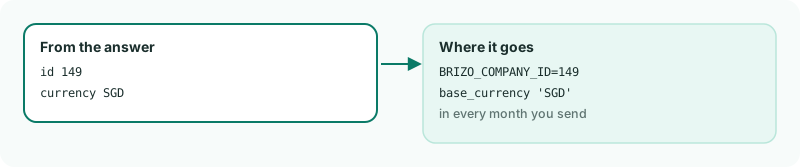
BRIZO_COMPANY_ID, the currency goes in every month you send.4If it's refused
| 403 - does not hold the reference.read scope | The credential wasn't given Reference data (read). Create a new credential with every box ticked, as in Getting started. |
|---|---|
| 403 - available on the Premium edition | The group isn't on the Premium plan. |
| Sign-in refused (401) | The client id and secret do not match: check the two settings. This credential is revoked or has expired: create a new one. |
Want more detail? See the documentation