C# · Track 7 · Tutorial 4 of 5
Drill into an account, and read the cash flow
Go a level deeper: open a statement section into its accounts, and read the cash flow line by line.
You will needThe statements script from Read the profit and loss and the balance sheet.
By the endAccount-level figures for any section, and the cash flow as your reports show it.
1Open a section
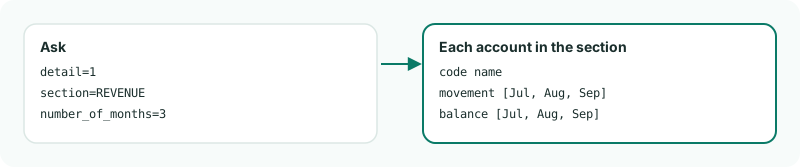
Add detail=1 and a section to a statement read, and it answers that section's accounts instead of the sections. Each account carries one figure per month asked for.
2Read revenue by account, and the cash flow
Create AccountDetail.cs:
AccountDetail.cs
// AccountDetail.cs - opens the REVENUE section account by account, then reads the cash flow.
public static class AccountDetail
{
public static async Task Run(string[] args)
{
var detail = (await Brizo.Call("GET", $"/organisations/{Brizo.CompanyId}/statements/profit-loss?period=2026-09&number_of_months=3&detail=1§ion=REVENUE")).Body!;
Console.WriteLine($"Revenue by account, {string.Join(", ", detail["months"]!.AsArray())}:");
foreach (var account in detail["data"]!.AsArray())
{
Console.WriteLine($" {account!["code"]} {account["name"]}: {string.Join(" / ", account["movement"]!.AsArray().Select(Brizo.Money))}");
}
var cash = (await Brizo.Call("GET", $"/organisations/{Brizo.CompanyId}/statements/cash-flow?period=2026-09&is_ytd=1")).Body!;
Console.WriteLine($"\nCash flow, {cash["period"]} ({cash["basis"]}):");
foreach (var line in cash["lines"]!.AsArray())
{
Console.WriteLine($" {line!["title"],-40}{Brizo.Money(line["value"])}");
}
}
}3Run it
dotnet run -- AccountDetailCheck
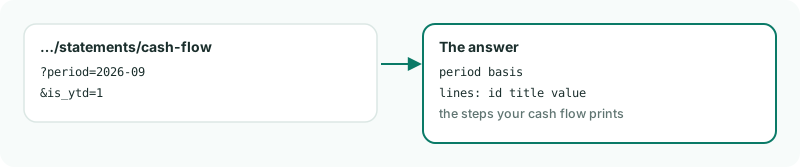
First the revenue accounts with a figure for each of the three months, then the cash flow's lines for the year to date. basis says whether you asked for the month or the year to date.
4Good to know
- The section has to be one of the statement's own: ask the balance sheet for
REVENUEand the answer lists the sections it does have. - The cash flow's lines and their order come from the group's own cash flow report, so they match what the screen shows.
Want more detail? See the documentation