C# · Track 2 · Tutorial 2 of 4
Check a chart before you send it
Ask BrizoConsol whether a chart is well formed before you send it - nothing is written, and every problem comes back with the record it's in.
1When a check is worth it
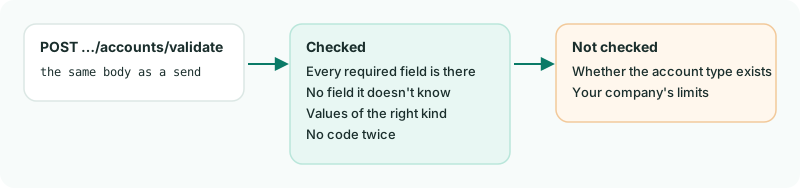
Before you point your code at a real company, you can ask BrizoConsol whether a payload is well formed - without writing anything. Add /validate to the address and send the same body.
2Check a chart with a mistake in it
Create CheckChart.cs. Its second account has no name:
CheckChart.cs
// CheckChart.cs - checks a chart before sending it. Nothing is written.
public static class CheckChart
{
    public static async Task Run(string[] args)
    {
        var answer = await Brizo.Call("POST", $"/organisations/{Brizo.CompanyId}/accounts/validate", new
        {
            declarations = new { source_reference = "my-ledger" },
            records = new object[]
            {
                new { code = "7000", name = "Bank charges", type = "Expense" },
                new { code = "7100", type = "Expense" }, // no name
            },
        });

        if (answer.Status == 200)
        {
            Console.WriteLine($"Valid: {answer.Body!["accepted"]} records would be accepted.");
        }
        else
        {
            Console.WriteLine("Not valid:");
            foreach (var error in answer.Body!["errors"]!.AsArray())
            {
                Console.WriteLine($"  record {error!["records_index"]}: {error["field"]} - {error["code"]}");
            }
        }
    }
}
3Run it
dotnet run -- CheckChartCheck
Not valid:
  record 1: name - required_field_missing
Record 1 - the second record, counting from 0 - has no name. Add a name and run it again, and it answers Valid: 2 records would be accepted.
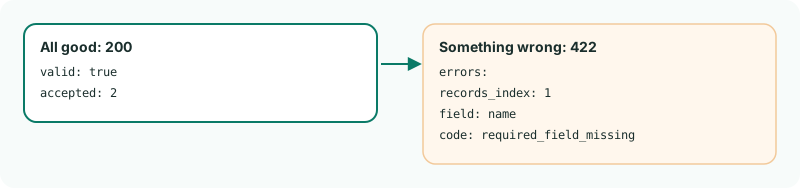
200 with how many records would be accepted, or 422 with each problem.4What a check can't tell you
A check looks at each record's shape. It doesn't look up whether the account type exists or whether the company has room for more accounts: those are only known when you send. And it writes nothing - a check is never a substitute for sending.